Save Word as PDF
If a certain Word document received by email is not displayed correctly or cannot be opened at all, this may happen for many reasons: there is no required software installed on a tablet, or the preferred font is not there on the computer, etc.
Saving this document as a bitmapped PDF file will be a good solution. A bitmapped PDF will ensure that the document will be opened on any PC, tablet, or a smartphone.
The PDF format is known for its portability. It will accurately display any document on any electronic device. A bitmapped PDF will guarantee that each page of a document will contain one graphic file which will be displayed correctly regardless of the circumstances.
On this page:
- Saving a Word document as PDF
- How to save Word as Bitmapped PDF?
- Keep the Word document background in the output PDF
- Place watermark on the document
- How to add a letterhead to a PDF document?
- Password protection
- Convert Word to PDF in batch mode
- Word to PDF conversion automation in the office
- Word to PDF converting code examples for developers
- Command line tool for converting documents automatically
- DocuFreezer is an easy Word to PDF Converter Software
Saving a Word document as PDF
Saving the document as a PDF file before sending it over by email means that the recipient will be able to open it on any computer or a tablet. The document will not be distorted and will look exactly the same as the original.
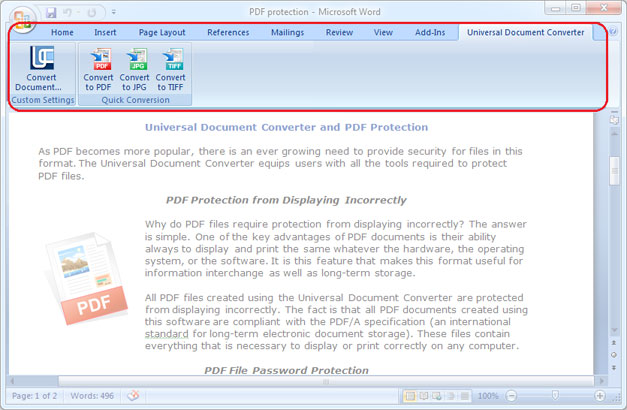
To save Word document as PDF, download and install the Universal Document Converter. Open the document, select Universal Document Converter toolbar and click Convert to PDF:
How to Save Word as Bitmapped PDF
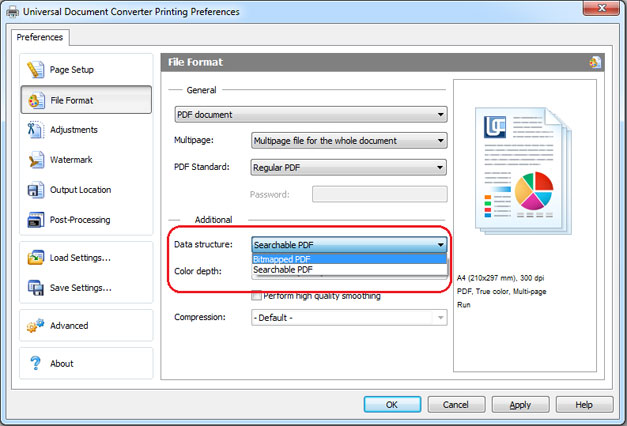
By default, Universal Document Converter will save any document as a searchable PDF file. It means that the text contained in the document becomes searchable by a key word or a phrase. It also means that anybody who will receive this document by email will be able to copy any text from it. To disable Copy & Paste option for your documents, convert Word documents to bitmapped PDF. Please follow the instruction:
- Open the document and click Print
- Select Universal Document Converter from the list and click Properties
- Go to File Format, select PDF Document as output format and select Bitmapped PDF (like on the screenshot below)
- Click OK to start saving a Word document as a Bitmapped PDF.
Keep the Word Document Background in the Output PDF
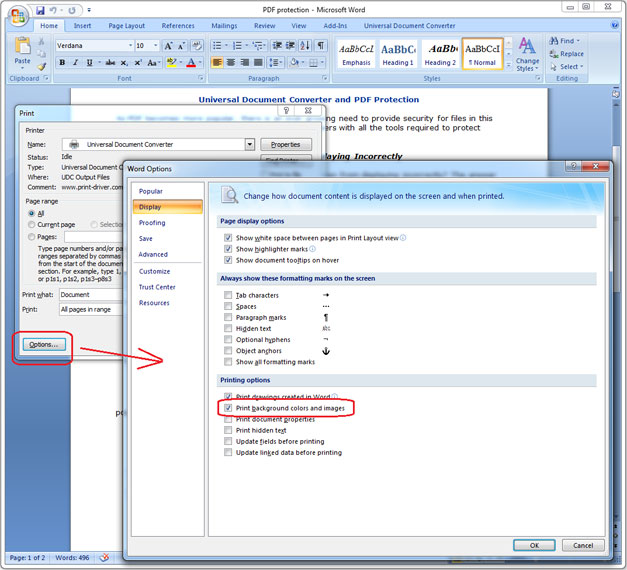
If the background color or an image in a document fails to be printed, it’s necessary to do the following:
- Open Print window and click on Options… in the bottom left corner
- In the group Printing options select Print background colors and images
Place Watermark on the Document
Watermarking is used when it’s necessary to point out the significance of a document (i.e. “strictly confidential”, etc), or to protect intellectual property.
To place the watermark, please follow the instruction:
- Open the Word document and click Print
- Select Universal Document Converter from the list and click Properties
- Go to File Format, select PDF Document as an output format
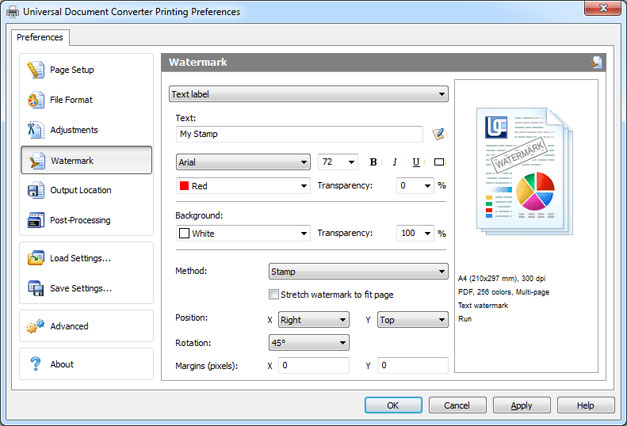
- Go to Watermark, choose between Text label or Picture and select the desired settings
- Click OK to start the conversion process.
How to Add a Letterhead to a PDF Document
Adding a letterhead to a PDF document will require two files: one containing the letterhead, and another one containing the Word document.
Please follow the instruction:
- Open the Word document and click Print
- Select Universal Document Converter from the list and click Properties
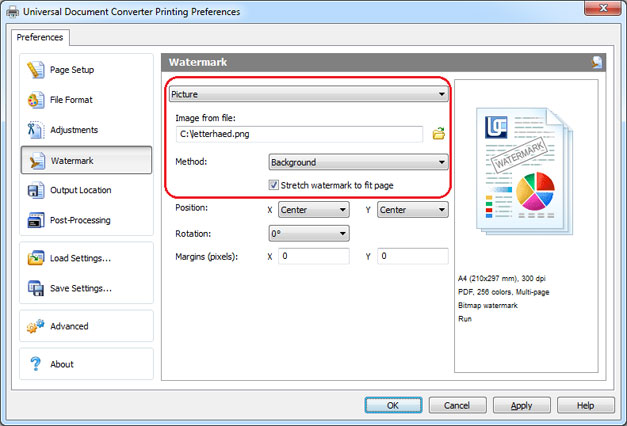
- In the settings select Picture (as shown on the screenshot below)
- Choose the image which size is approximately the same as the size of the document
- Select Background from the Method submenu
- Click on Stretch watermark to fit page
- Click OK to print the document in PDF.
Password Protection
To protect your document from unauthorized access please do following:
- Open the Word document and click Print
- Select Universal Document Converter from the list and click Properties
- Choose the file File Format the menu and be sure that the PDF Document is selected
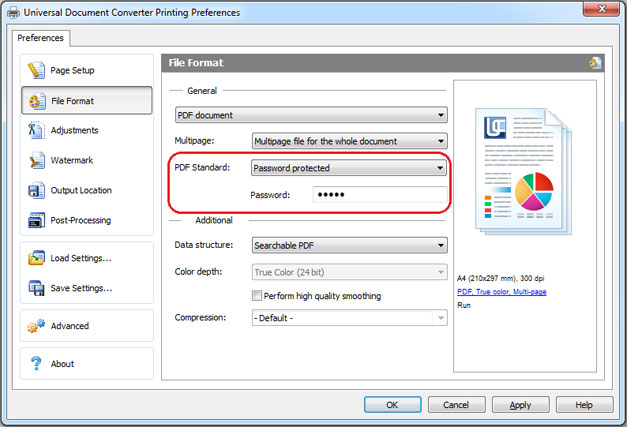
- In PDF Standard select Password protected and enter password like shown on the screenshot below
- In case you need to add pages to an existing PDF, the password should remain the same. If the existing PDF is not password protected, new pages should not be password protected either
- Click OK to print the document in PDF.
Convert Word to PDF in Batch Mode
To automate the process of Word files conversion, you will need three programs: Microsoft Word, Universal Document Converter, and Print Conductor.
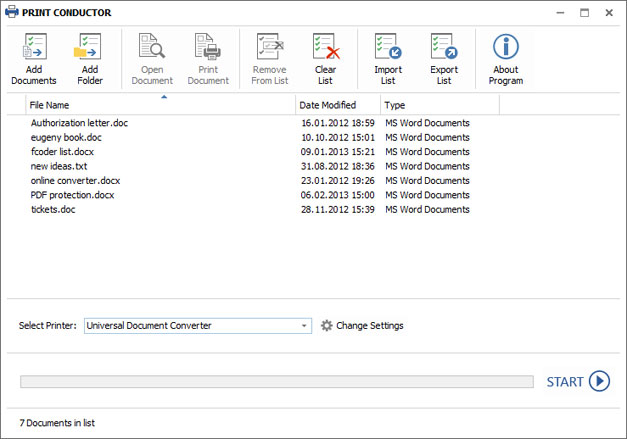
- Start Print Conductor and add your Word documents to the list
- Select Universal Document Converter printer
- Click Change Settings and specify PDF Document as the output file type
- Click Start to begin converting the list of Word documents to PDFs:
Word to PDF Conversion Automation in the Office
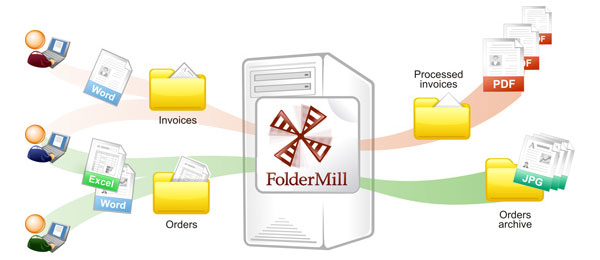
Automatic document conversion can be performed by means of the FolderMill software. The software is normally installed on server to monitor the incoming files. Specific rules set up by the company employees will be followed to guarantee that all the files received from the outside resources will be converted to the desired file formats according to the employees’ individual preferences.
For instance, in case the received image file is saved in the PDF format, it will be automatically converted to JPEG, or vice versa. There is nothing to be done manually. All the company employees need to do is to copy the PDF file that he/she needs to convert into his/her personal network folder and receive the converted document from another folder.
Word to PDF Converting Code Examples for Developers
The Universal Document Converter package includes a public API and example code for integration in the independent developer and system integrator software. In addition, automatic deployment speeds up the installation of the Universal Document Converter significantly if it needs to be installed on a large number of workstations.
Thanks to this, using Universal Document Converter as the “conversion kernel” helps developers focus on implementing the unique features of their solutions without wasting time or effort on developing a virtual printer in house.
You are welcome to look at examples of converting Word to PDF for different programming languages.
Command Line Tool for Converting Documents Automatically
2Printer is the command line utility that can automate printing Word documents and text files. The command line interface enables the users to create batch-files for automating their specific printing needs. This tool may be included in your Windows Task Scheduler to automate printing process on your computer.
2Printer uses public API of Microsoft Word to print text files. It means that in necessity to print the documents saved as TXT, RTF, DOC or DOCX, you need to have Microsoft Word on your computer.
2Printer is compatible with any mechanical printers connected to a computer or accessed via the local networks, and also virtual printers like Universal Document Converter. Thank of this, you are able to convert Word documents to PDF if you select Universal Document Converter as a printer in 2Printer command line.
DocuFreezer is Easy Word to PDF Converter Software
DocuFreezer is designed to convert Microsoft Word, Excel and PowerPoint documents to PDF saving internal and external links, page layouts and fonts.
Users of DocuFreezer will benefit from numerous conversion options – the software will convert documents and PDF files to JPG, TIFF or PNG formats “freezing” the look of the original documents and protecting them from any amendments. No matter which device the document will be displayed on, it will look exactly the same.
DocuFreezer is free for non-commercial purposes. Try DocuFreezer now and see how efficiently the program works!
Related conversion tutorials:
-

Elizabeth Kotaeva
Copywriter from Russia
«At the present moment, I can already say that the use of Universal Document Converter has raised the return on orders that were not paid for in advance by approximately 30%!»