Convert PDF to JPG
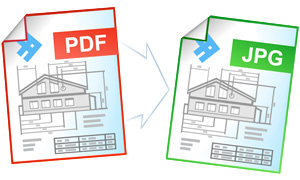
Today, PDF is the most popular solution for storing and exchanging electronic documents. The need to convert PDF files to JPEGs arises when there is a necessity to publish the documents in the Internet, to use them for presentations or videos, or to send them to CRM or EPR systems.
On this page:
- How to convert PDF to JPG?
- Make JPEG thumbnails out of PDF files
- Save several PDF pages as a single JPG file
- Avoiding the corrupted fonts issue using “Print as image”
- Convert PDF to JPG in batch mode
- Automate converting PDF to JPG on corporate computers
- PDF to JPG converting code examples for developers
- Command line tool for converting PDFs automatically
- DocuFreezer Can Convert PDF to JPG, TIFF or PNG
How to Convert PDF to JPG
The easiest way to convert PDF to a JPEG file is to print it using a virtual printer. A virtual printer differs from a desktop printer only in that instead of printing the document on a sheet of paper it saves the document as a PDF graphic file (JPEG, TIFF or PNG).
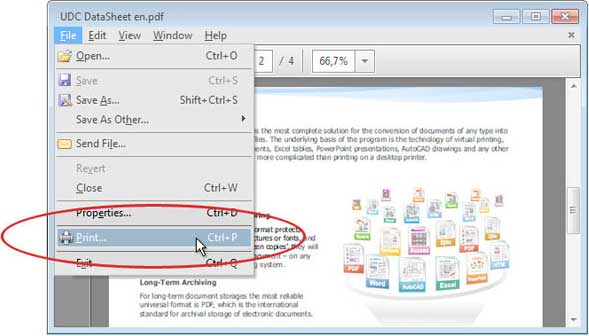
To convert PDF to JPEG, download and install the Universal Document Converter. Then, please follow this manual:
Make JPEG Thumbnails out of PDF Files
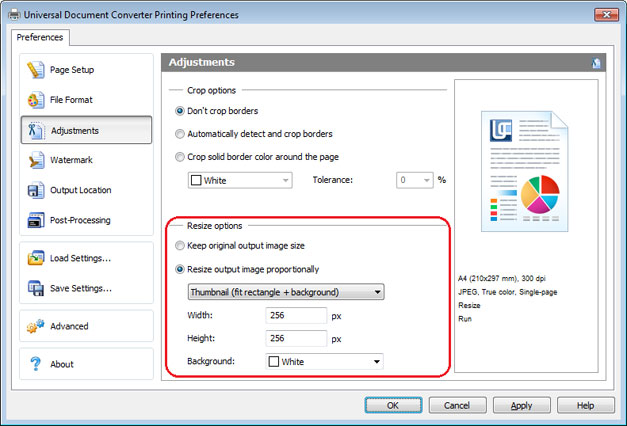
Universal Document Converter will be able to proportionally resize the document before saving it in the selected output format. Thanks to a high quality bilinear interpolation algorithm, we guarantee the minimal loss of quality, and the output image file will look as good as the original. You can create thumbnails out of the converted files to make good use of them in the web or in presentations.
To make thumbnails of a PDF document in JPEG format please follow the instruction:
- Open PDF and press File->Print in Adobe Reader menu
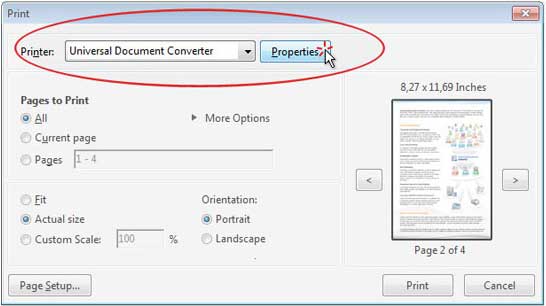
- Select Universal Document Converter from the list of printers and click Properties
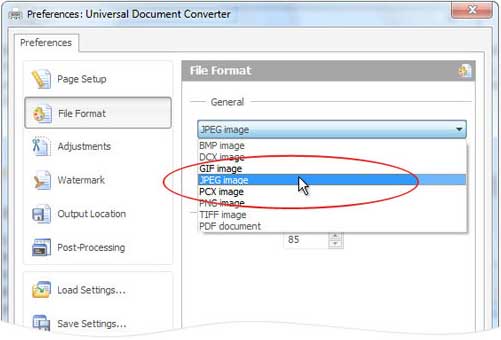
- On the settings panel click on File Format and select JPEG Image
- Click on Adjustments and check Resize output image proportionally like you see on the screenshot below
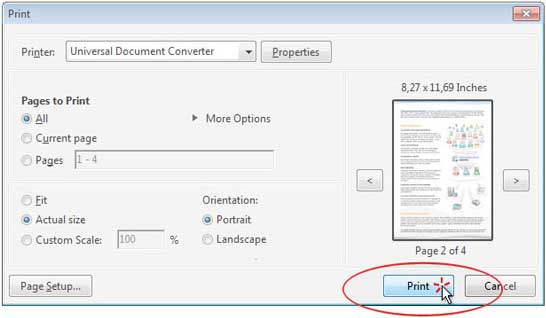
- Click OK to save settings and Print to start the conversion process.
Save Several PDF Pages as a Single JPG File
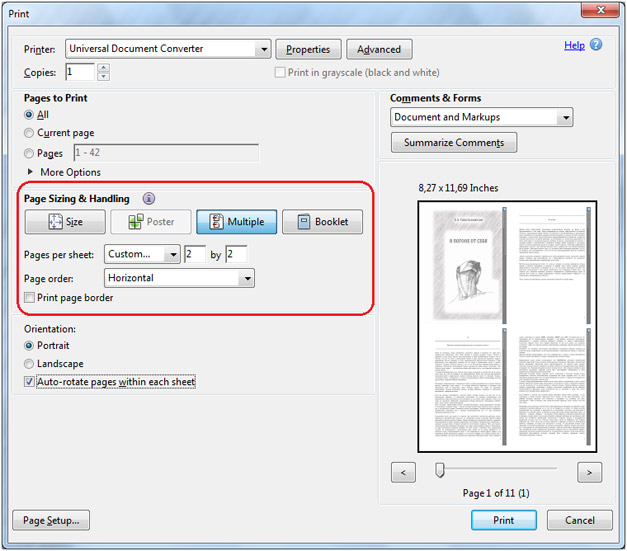
To save several PDF pages as a single JPG file please follow the instruction:
- Open PDF and press File->Print in Adobe Reader menu
- Select Universal Document Converter from the list of printers and click Properties
- Select JPEG Image in File Format window and click OK
- Click Multiple and select number of pages you need to paste on the output image file horizontally and vertically like shown on the screenshot below
- Press Print to start the conversion process.
Avoiding the Corrupted Fonts Issue Using “Print as image”
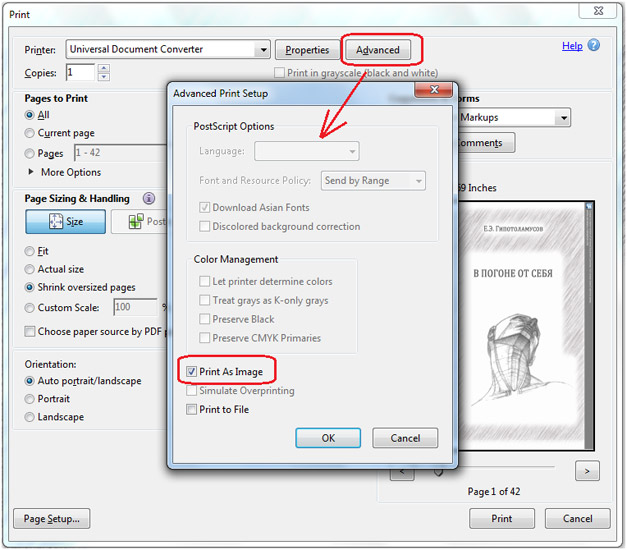
To represent and print the documents Adobe Reader makes use of quite different algorithms which may cause printing issues related to displaying fonts and images, while these fonts and images are displayed on the screen correctly.
To solve the problem, please follow the instruction:
- Open PDF and press File->Print in Adobe Reader menu
- Select Universal Document Converter from the list of printers and click Advanced
- Click Print as image as shown on the screenshot below
- Click OK to save settings and click Print to start the conversion process.
Convert PDF to JPG in Batch Mode
Three software applications are required to make the conversion from PDF to JPG: Adobe Reader (or Adobe Acrobat), Universal Document Converter, and Print Conductor.
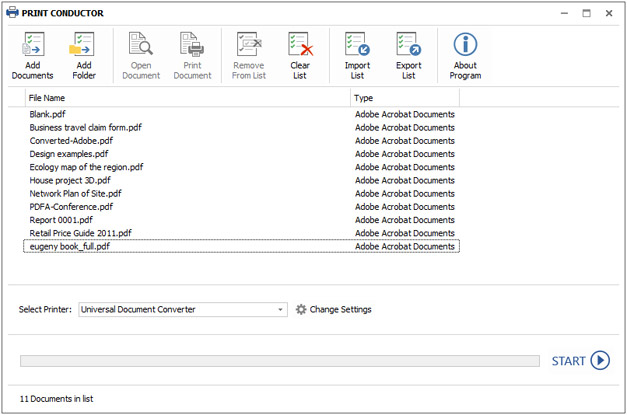
- Start Print Conductor and add your PDF files to the list
- Select Universal Document Converter printer
- Click Change Settings and specify JPEG Image as the output file type
- Click Start to begin converting list of PDF files to JPEGs:
Automate Converting PDF to JPG on Corporate Computers
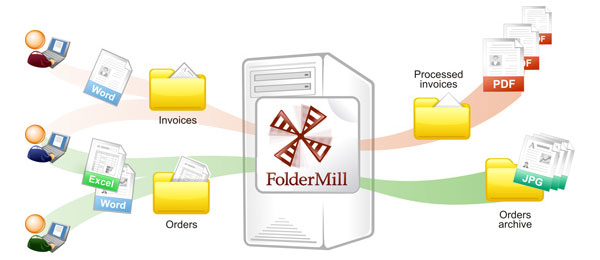
FolderMill software has been designed to track all the files incoming into the corporate computers. In case the file extension is different from the one required, it will start the automatic process of file conversion.
For example, if the received file is saved in PDF it can automatically convert it to JPG.
PDF to JPG Converting Code Examples for Developers
Software developers can benefit from using the Universal Document Converter which contains public API and example code for software integration. If the Universal Document Converter needs to be installed on a large number of computers at the same time, the installation process will be pretty quick by means of the automatic deployment.
Developers will be able to introduce their own document processing solutions using the resources offered by the Universal Document Converter.
Here are some examples for PDF to JPEG conversion in different programming languages.
Command Line Tool for Converting PDFs Automatically
2Printer is the command line utility that can automate printing PDF files. The command line interface enables the users to create batch-files for automating their specific printing needs. This tool may be included in your Windows Task Scheduler to automate printing process on your computer.
2Printer uses public API of Adobe Reader or Adobe Acrobat to print PDFs. It means that you need to have this software on your computer.
2Printer is compatible with any mechanical printers connected to a computer or accessed via the local networks, and also virtual printers like Universal Document Converter. Thank of this, you are able to convert PDF to JPG if you select Universal Document Converter as a printer in 2Printer command line.
DocuFreezer Can Convert PDF to JPG, TIFF or PNG
DocuFreezer will release you from printing documents on paper and then scanning them to make a digital copy. The quality of output PDF or an image file will be significantly higher than the ones scanned!
Related conversion tutorials:
-

Alan Schoen
USA
«Universal Document Converter is so user-friendly that one doesn't have to remember anything in particular about how to use it. It's structured in such a common-sense way that it just automatically explains itself to the user.»