Convert Excel to JPEG
Excel to JPEG conversion is probably the most called for. Excel spreadsheets or diagrams are hard to distribute, and the only way to make them more dynamic is to convert them to another format that is more web-friendly. JPEG files can be viewed from any web browsers, which makes conversion from Excel to JPEG very advantageous. The Excel data then can become available to any other interested parties and can be shared in a few minutes. Universal Document Converter can help you convert your Excel files to JPEG.
On this page:
- How to save Excel as JPEG?
- Save an Excel worksheet as a single JPG file
- Watermarking the Excel document
- Convert Excel to JPEG in batch mode
- Automatic Excel to JPEG conversion in the office
- Excel to JPEG conversion code examples for developers
How to Save Excel as JPEG
Saving your Excel file as JPEG can be done with the help of the Universal Document Converter – virtual printer that will not really “print” your files, but will change the format they are saved in. Excel files can easily be saved as JPEG files.
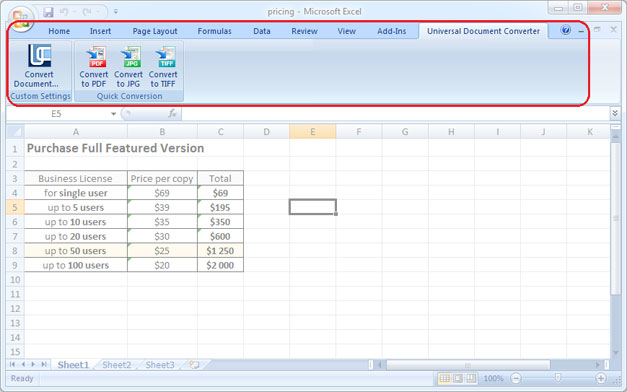
Universal Document Converter adds a toolbar with “hot buttons” into the Microsoft Excel interface. Conversion from Excel to JPEG can be performed in just a couple of clicks: go to the toolbar of the Universal Document Converter and press one of the three buttons: Convert to PDF, Convert to JPG, or Convert to TIFF.
Save an Excel Worksheet as a Single JPG File
You can save an Excel worksheet or a diagram as a single JPG file using Universal Document Converter. Please follow the instruction:
- Open Page Layout toolbar in Microsoft Excel and click the bottom-right corner
- Select Fit to 1 page wide by 1 tall feature like shown on the screenshot below
- Click OK and print Excel file in JPG using Universal Document Converter as a printer.

Watermarking the Excel Document
To place a watermark on the Excel document please do the following:
- Open the document in Microsoft Excel and click Print
- Select Universal Document Converter printer and click Properties
- Choose JPEG Image as an output file format
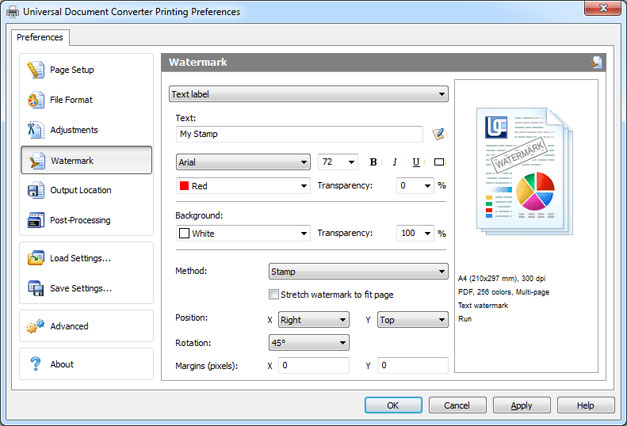
- Go to the Watermark menu and select Text label or Picture. Introduce the desired settings.
- Click OK to start the conversion process of Excel into JPEG.
Convert Excel to JPEG in Batch Mode
Conversion of several Excel files to JPEG is possible with the help of the Print Conductor – the software that comes along with Universal Document Converter.
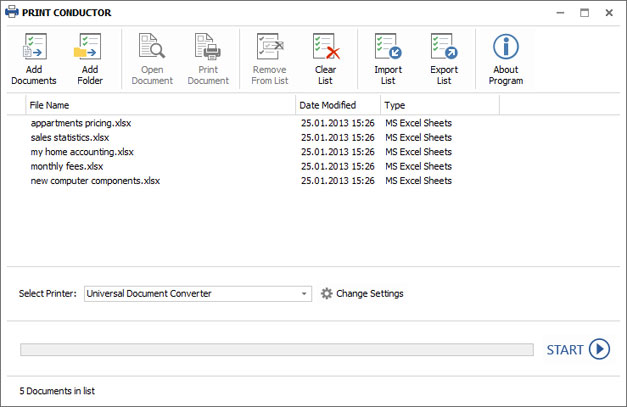
- Start Print Conductor and add your Excel files to the list of files to be processed
- Select Universal Document Converter from the list of printers and click Change Settings
- Specify JPEG Image as the type of output file in the settings and click OK
- Press Start to begin converting Excel to JPEG in batch mode.
Automatic Excel to JPEG Conversion in the Office
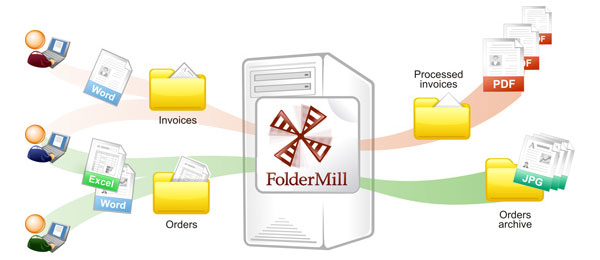
Office employees normally have to waste time converting files that come from various sources into the format they really use. To automate this process you can use Folder Mill – the software that is usually installed on server. Folder Mill will watch the incoming files and will convert them to another format according to the preferences existing with the company staff.
All the company employees will need to do is to make use of two folders and place the incoming files into one folder, and take the output files from another folder already saved in the file format they prefer. The conversion process itself will be performed automatically.
Excel to JPEG Conversion Code Examples for Developers
Software developers can make use of the existing resources offered by Universal Document Converter. With the help of our public API and code examples it’s possible to use the existing conversion practices in other conversion projects.
Take a look at examples of how to convert Excel to JPEG in different programming languages.
Related conversion tutorials:
-

DI Alfred Dietrich
Austria
«I use all of the MS Office programs with the Universal Document Converter being an indispensable addition for creating PDF files and converting files to JPG and TIF file formats. The Universal Document Converter is intuitive in its structure, easy to handle and, most importantly, extremely reliable. Currently, I am using the 6.0 version on Windows 7 and I am very happy with it.»