How to Save Excel as PDF
Microsoft Excel is used for working with electronic sheets. Apart from comprising all the data into charts, the program enables the user to perform mathematical functions making corresponding diagrams. Besides, Microsoft Excel makes it possible to upload data from outside resources and data bases.
The structure of the document received as a result becomes pretty complicated and contains internal and external links. These factors make documentary exchange within the Excel format more difficult.
To ensure that the recipient will be able to open the documents it may be reasonable to convert Excel to PDF before sending it over by email.
The PDF file received after conversion becomes structurally integral and platform independent. There will be no links to external resources and no calculation methods mentioned, etc.
On this page:
- How to save Excel as PDF?
- How to save an Excel workbook as a single PDF?
- Transfer a whole worksheet onto one PDF file page
- Watermarking the Excel document
- Password Protection
- Convert Excel to PDF in batch mode
- Automatic Excel to PDF conversion in the office
- Excel to PDF conversion code examples for developers
- Command line tool for converting worksheets automatically
How to Save Excel as PDF
To save an Excel document as a PDF file make use of a virtual printer such as the Universal Document Converter. Virtual printer means that the document sent for printing is not actually printed out on a sheet of paper, but is sent to the specified folder. Plus, the document will be converted into a desired format, i.e. from Excel to PDF.
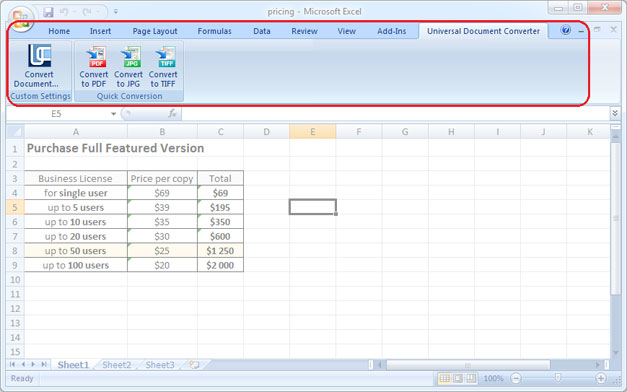
To simplify the document conversion the Universal Document Converter adds a toolbar with “hot buttons” into the Microsoft Excel main window. Document conversion in this case will be performed with only a couple of clicks: go to toolbar of the Universal Document Converter and press one of the three buttons: Convert to PDF, Convert to JPG or Convert to TIFF.
How to Save an Excel Workbook as a Single PDF
Saving Excel workbook as a single PDF is a little bit tricky. This video tutorial will show how to solve this quest:
Transfer a Whole Worksheet onto One PDF File Page
In case you need to insert a sheet or a diagram into a single PDF file page, please do following:
- Open Page Layout toolbar in Microsoft Excel and click to bottom-right corner of it
- Select Fit to 1 page wide by 1 tall feature like shown on the screenshot below
- Click OK and print Excel file in PDF using Universal Document Converter as a printer.

Watermarking the Excel Document
To place a watermark on the document please do the following:
- Open the document in Microsoft Excel and click Print
- Select Universal Document Converter printer and click Properties
- Choose PDF document as an output file format
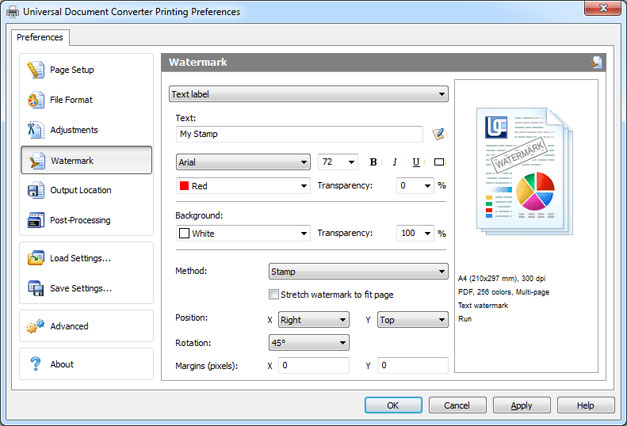
- Go to the Watermark menu and select Text label or Picture. Introduce the desired settings.
- Click OK to start the conversion process of Excel into PDF.
Password Protection
To protect your document from unauthorized access please do following:
- Open the document in Microsoft Excel and click Print
- Select Universal Document Converter printer and click Properties
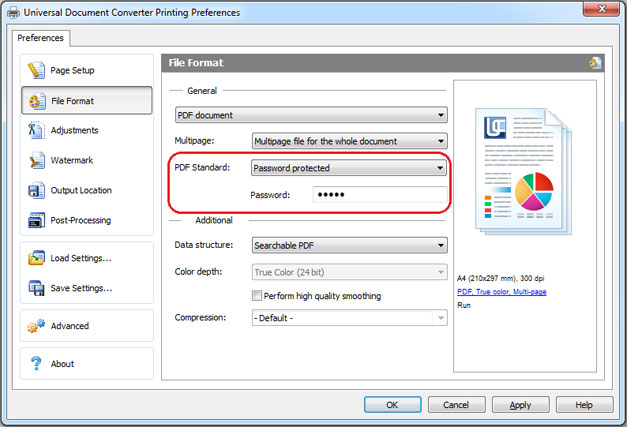
- Select the File Format in the settings menu and make sure that the output format specified is PDF Document
- In PDF Standard select Password protected and enter the password like shown on the screenshot below
- If you need to add more pages to an existing PDF file the password should remain the same. In case the PDF file is not password protected, you should not password protect any other added pages.
- Click OK and print Excel to PDF using the Universal Document Converter.
Convert Excel to PDF in Batch Mode
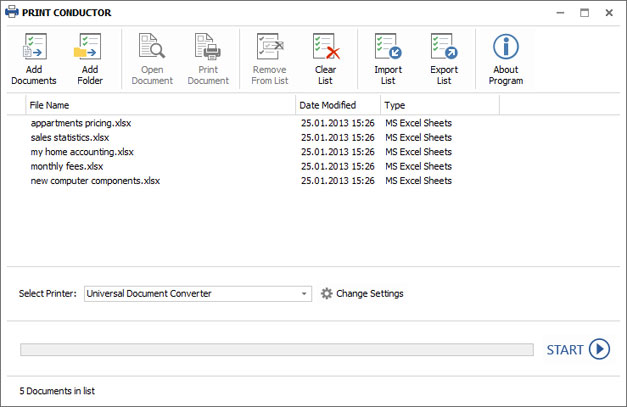
To automate the Excel to PDF conversion in batch mode you need three programs: Microsoft Excel, Universal Document Converter and Print Conductor.
- Start Print Conductor and add your Excel files to the list of files to be processed
- Select Universal Document Converter from the list of printers and click Change Settings
- Specify PDF Document as the type of output file in the settings and click OK
- Press Start to begin converting Excel to PDF in batch mode.
Automatic Excel to PDF Conversion in the Office
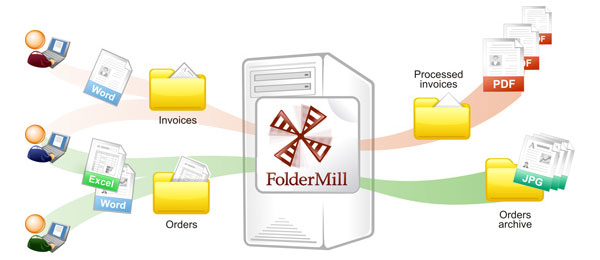
Receiving numerous files from different sources may cause frustration with the company employees. To avoid this problem as well as the waste of time necessary to convert the files into the preferred format use Folder Mill designed to automate the conversion process.
FolderMill will closely monitor all the incoming files and will convert them to another format. There is nothing to be done manually apart from specifying, for instance, that all the files received in the Excel format should be automatically converted to PDF.
Excel to PDF Conversion Code Examples for Developers
The Universal Document Converter package includes a public API and example code for developers to be integrated into their own systems. Automatic deployment will speed up the process if there is a necessity to install the Universal Document Converter onto a large number of workstations.
The kernel of the Universal Document Converter allows software developers use its features into newly developed products. See examples of converting Excel to PDF for different programming languages.
Command Line Tool for Converting Worksheets Automatically
2Printer is the command line utility that can automate printing Excel documents. The command line interface enables you to create batch-files for automating your specific printing needs. This tool may be included in your Windows Task Scheduler to automate printing process on your computer.
2Printer uses public API of Microsoft Excel to print worksheets. It means that in necessity to print the documents saved as XLS or XLSX, you need to have Microsoft Excel on your computer.
2Printer is compatible with any mechanical printers connected to a computer or accessed via the local networks, and also virtual printers like Universal Document Converter. Thank of this, you are able to convert Excel documents to PDF if you select Universal Document Converter as a printer in 2Printer command line.
Related conversion tutorials:
-

Arthur Rabatscher
AR-Soft Widnau GmbH, Switzerland
«On a Delphi-Developer-Homepage we found an example how to convert Word- or Excel Documents into PDF. Within this source code the use of the OCX of the Universal Document Converter was shown. This was the easiest way, how we could convert all kinds of documents into the PDF Format.»