How to Convert PowerPoint to PDF
By converting PowerPoint presentations to the PDF format you will ensure the recipient to be able to open the presentation on practically any computer or an electronic device. This type of conversion will also protect the graphic elements and text that the slides contain from unauthorized copy & paste.
On this page:
- How to save PowerPoint as PDF?
- Place watermark on each presentation slide
- Save presentation as password protected PDF
- Export PowerPoint to PDF in batch mode
- PowerPoint to PDF automatic conversion
- PowerPoint to PDF automation code for developers
How to Save PowerPoint as PDF?
- Download and install Universal Document Converter
- Open Microsoft PowerPoint presentation
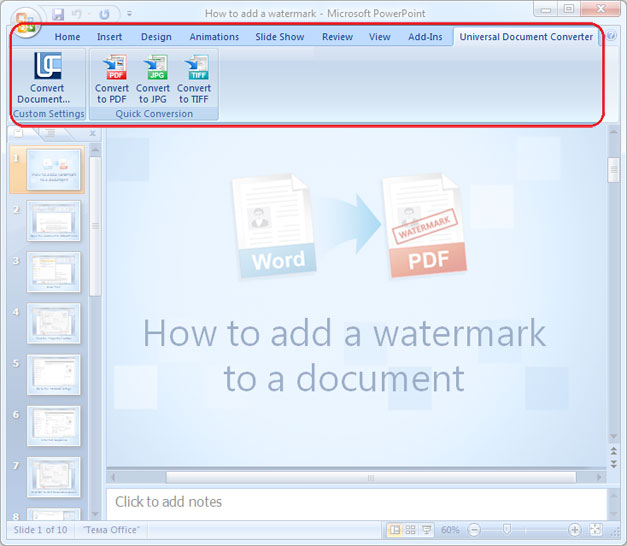
- Go to the Universal Document Converter toolbar and click Convert to PDF
Place Watermark on Each Presentation Slide
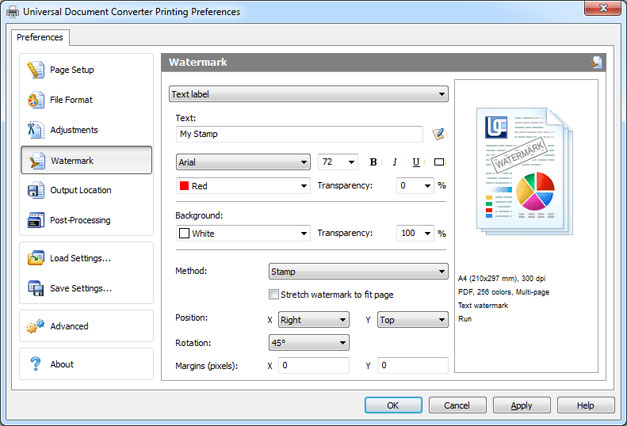
Converting PowerPoint to PDF using Universal Document Converter will let you add a phrase or a certain picture onto each slide to protect your authorship or for promotional purposes.
- Open PowerPoint presentation and click Print
- Select Universal Document Converter from the list of printers and click Properties
- Go to File Format and select PDF Document
- Go to Watermark and select Text label or Picture depending on the type of the watermark
- Click OK and print PowerPoint presentation into the PDF format using Universal Document Converter as a printer
Save presentation as password protected PDF
To protect your PowerPoint slides from unauthorized use you can convert them into the password protected PDF file. Please follow the instruction:
- Open PowerPoint presentation and click Print
- Select Universal Document Converter from the list of printers and click Properties
- Go to File Format and select PDF Document
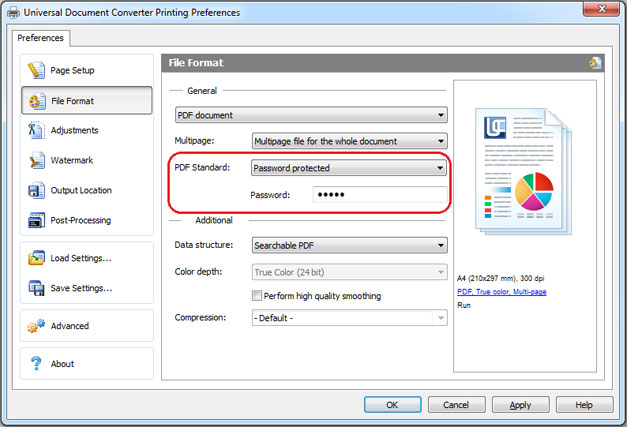
- Select Password protected in PDF Standard like shown on the screenshot below
- Click OK and print your presentation into the password protected PDF file using Universal Document Converter as a printer.
Export PowerPoint to PDF in batch mode
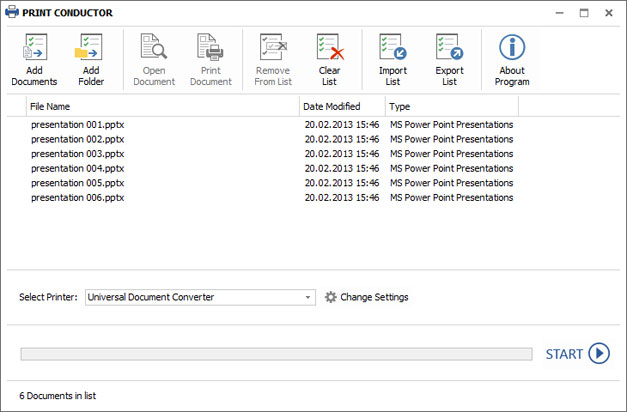
Conversion of PowerPoint presentations to PDF in batch mode can be performed with the help of Print Conductor – powerful software for batch document conversion. Here is what you can do to convert several PowerPoint presentations to PDF:
- Add PowerPoint presentation files to Print Conductor
- Select Universal Document Converter from the list of printers
- Click Change Settings and select PDF Document as an output format
- Click OK to apply the necessary settings and click Start to begin converting PowerPoint to PDF in batch mode
PowerPoint to PDF Automatic Conversion
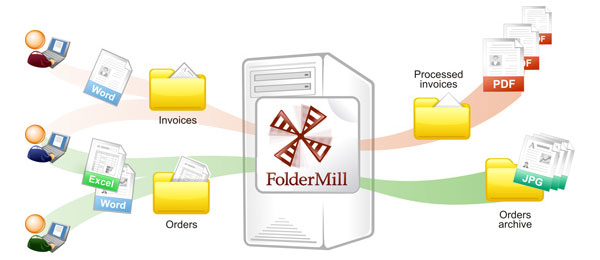
Setting automatic conversion from PowerPoint to PDF, especially on corporate computers, can be done using Folder Mill – the software that will set automatic conversion settings. Each time you will receive the PowerPoint files and will need to convert them to PDF, this conversion will be performed automatically – all you need to do is to specify the conversion rule to the software.
- Install FolderMill on the server
- Get two folders for each employee. For example, employee John will get the following folders: C:\Joon-Input and C:\John-Output
- Add a new rule to FolderMill: folder C:\Joon-Input will receive the PowerPoint presentation files, and folder C:\John-Output will get the PDF files created from PowerPoint presentations
- Now FolderMill is ready to get all the files put to C:\Joon-Input and automatically convert them to PDF. The converted files will be saved at C:\John-Output. John and other employers will not need to install any additional software. They will only need to copy PowerPoint files into one folder and get PDF files from another one.
PowerPoint to PDF Automation Code for Developers
The Universal Document Converter package includes useful resources for developers. Public API and code examples, as well as the automatic deployment will help install and use the Universal Document Converter on a number of workstations.
The Universal Document Converter can be used as the “conversion kernel”, which means that the developers can utilize the existing resources for their own projects implementation. Here are some examples of converting PowerPoint presentations to PDF in different programming languages.
Related conversion tutorials:
-

Dr. Gisella Brandani
Dental Practice, Florence, Italy
«I use the software when I need to convert many types of files into JPEG using the certified email system with Thunderbird. Only using the JPEG format I can see the attachments displayed in open view in the receipt.»