Universal Document Converter Web Activation
Activate by Web
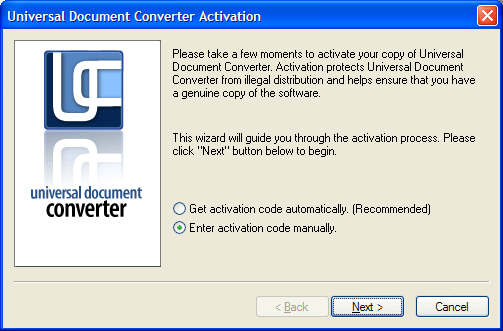
Sometimes automatic activation is not possible. This occurs when your computer is connected to the internet by firewall or if your internet connection is disabled. In this case please select “Enter activation code manually” and press “Next” button:
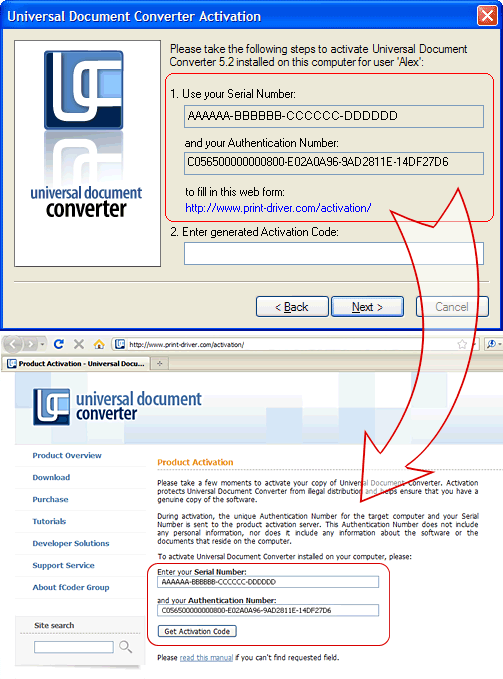
If your computer is not connected to the Internet, you can open activation link from any other computer and enter your activation data (Serial Number and Authentication Number):
Press “Get Activation Code” button, copy received code and paste it into Activation Wizard:
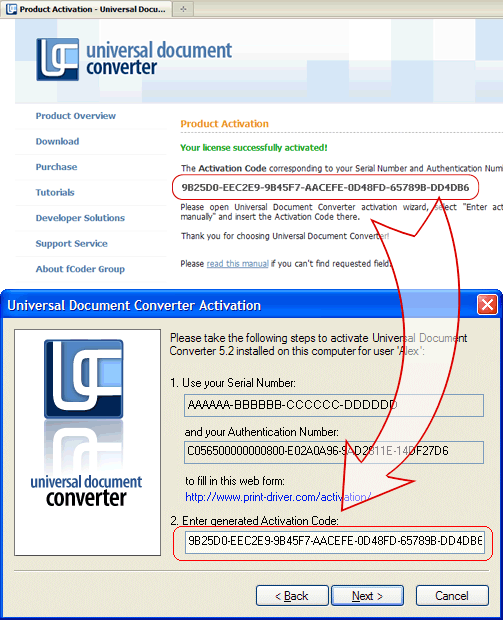
Press “Next” button to finish activation.
If you overhaul your computer by replacing a substantial number of hardware components, it may appear to be a different PC. You may have to reactivate Universal Document Converter. If this should occur, you can contact support service to reactivate the software.