Text Watermark
A text watermark is a series of text strings applied to the pages of output files. The interface controls below are used to configure this functionality.
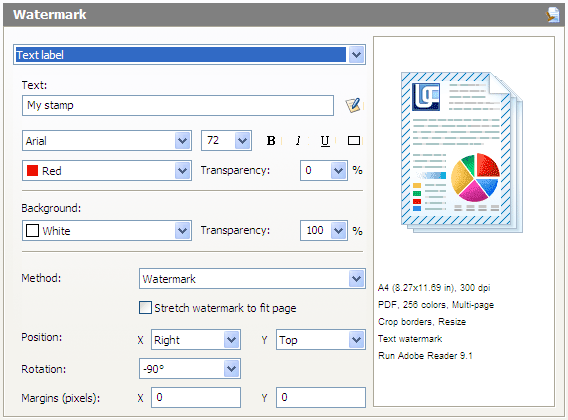
Text. The watermark string. It may contain the following macros that the software replaces with actual values at runtime.
| Macro | Description | Example value |
|---|---|---|
| &[DocName(0)] | Document Name | My Document |
| &[DocName(1)] | Uppercase Document Name | MY DOCUMENT |
| &[DocName(2)] | Lowercase Document Name | my document |
| &[Page(0)] | Page Number | 3 |
| &[Page(2)] . . . &[Page(6)] |
Page Number of between 2 and 6 Digits | 05 000005 |
| &[Year(0)] | Current 4-Digit Year | 2009 |
| &[Year(1)] | Current 2-Digit Year | 09 |
| &[Month(0)] | Current Month as Text | February |
| &[Month(1)] | Current Month as 2-Digit Number | 02 |
| &[Month(2)] | Current Month as Roman Numerals | II |
| &[MonthDay(0)] | Current Date | 3 |
| &[MonthDay(1)] | Current 2-Digit Date | 03 |
| &[WeekDay(0)] | Current Day of Week as Text | Tuesday |
| &[WeekDay(1)] | Current Day of Week as Number | 3 |
| &[WeekDay(2)] | Current Day of Week as 2-Digit Number | 03 |
| &[Date(0)] | Current Complete Date | Tuesday, February 03, 2009 |
| &[Date(1)] | Current Complete Date as dd.mm.yyyy | 03.02.2009 |
| &[Date(1)] | Current Complete Date as dd.mm.yy | 03.02.09 |
| &[Hour(0)] | Current Hour in 24-Hour Format | 21 |
| &[Hour(1)] | Current Hour in 12-Hour Format | 09 |
| &[Hour(2)] | AM or PM | am |
| &[Min(0)] | Current Minutes | 31 |
| &[Sec(0)] | Current Seconds | 38 |
| &[Time(0)] | Current Time in hh-mm-ss Format | 09-31-38 |
| &[Time(1)] | Current Time in hh-mm (24-Hour) Format | 21-31 |
| &[Time(2)] | Current Time in hh-mm (12-Hour) Format | 09-31 |
Macros may be entered manually or selected from a list by pressing
 . An example is given next to the name of each macro as an illustration of what the resulting file will look like.
Font. Watermark font.
Size. Watermark font size.
B. Bold.
I. Italics.
U. Underline.
"Border". Border around the watermark.
Background Color. Watermark background color.
Transparency. Watermark transparency (as a percentage value).
Method. Watermark string application method:
- stamp: the string is superimposed on the document;
- watermark: the string is "mixed" in with the contents of the document;
- background: the string is applied behind the document.
Stretch Watermark to Fit Page. Enables the watermark to be stretched to fit the entire page.
Position X. Watermark horizontal alignment: left, right, or center.
Position Y. Watermark vertical alignment: bottom, top, or center.
Rotation. Watermark rotation in degrees.
Margins (pixels) X. The number of pixels a watermark is offset horizontally with respect to a point set automatically based on alignment.
Margins (pixels) Y. The number of pixels a watermark is offset vertically with respect to a point set automatically based on alignment.
How to Watermark Multiple Files at Once