Adjustments
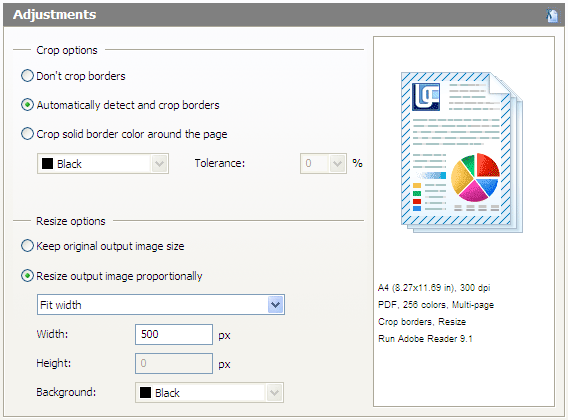
This tab is used to configure actions to be applied to original document pages. It consists of two primary sections: "Crop Options" and "Resize Options."
Crop Options
This area helps configure the source document empty border cropping functionality. It uses the following settings:
Don’t Crop. Border cropping disabled.
Automatically Detect and Crop Empty Borders. Automatically crop empty white borders.
Crop Solid Border Color Around the Page. Cropping of borders of a user-specified color.
- Color. Color of borders to be cropped in this mode.
- Tolerance. Maximum tolerance (percentage) with respect to the selected color of the margins to be cropped in this mode.
Resizing Options
This section helps resize original document pages. It uses the following settings:
Keep Original Output Image Size. Output file pages are not resized.
Resize Output Image Proportionally. Output file pages are resized based on specified settings.
- Resize Mode. Automatic output page resize mode.
- Fit Width: resize in proportion to the specified width.
- Fit Height: resize in proportion to the specified height.
- Fit Rectangle: resize to specified dimensions.
- Thumbnail: resize to specified dimensions and fill borders with the specified color.
- Width. Page width to be used in Fit Width, Fit Rectangle, and Thumbnail.
- Height. Page height to be used in Fit Height, Fit Rectangle, and Thumbnail.
- Background. Border color resulting from the resize operation in the Thumbnail mode.