Interface
All communication with the software takes place via the Universal Document Converter virtual printer configuration window. It is very simple and user-friendly. It enables the users to proceed directly to utilizing the software functionality without any special training.
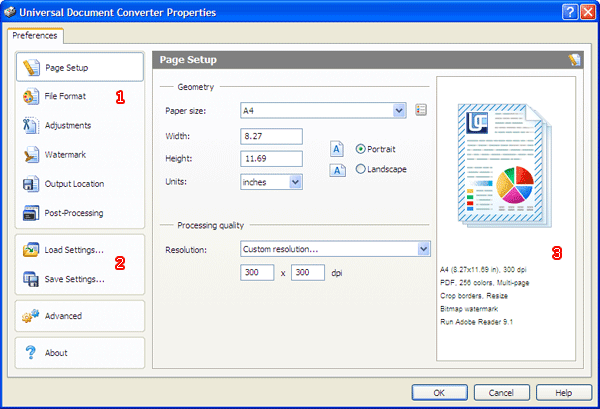
The virtual printer configuration window has three vertical areas. The first area houses tabs for accessing various conversion settings (1). It also contains buttons for accessing profiles (2).
The right-hand part of the window holds the preview area (3). It provides a preview of the resulting file representing all the changes that have taken place.
The middle part is where all the settings are entered. Its appearance changes depending on the tab that is selected at any given time.
Use the following links to browse pages containing the information about different parts of the user interface: